If you’re preparing for the Terraform Associate Certification, you’ve made a smart choice to advance your career in infrastructure automation and cloud-native development. This certification validates your expertise in HashiCorp Terraform and is in high demand among cloud professionals. Let’s break down a 21-day plan to help you prepare systematically.
Overview of the 21-Day Plan
This 21-day plan is designed for working professionals, offering manageable daily milestones. It focuses on understanding Terraform concepts, practicing hands-on labs, and reviewing exam-specific topics.
Overview of the Certification
Exam Details:
- Certification Name: HashiCorp Certified: Terraform Associate
- Exam Cost: Approximately $70 USD (depending on location and currency).
- Exam Format: Multiple choice and true/false questions.
- Exam Duration: 1 hour (60 minutes).
- Passing Score: 70% or higher.
- Prerequisites: None, but basic knowledge of cloud providers like AWS, Azure, or GCP is helpful.
- Registration: Register on the HashiCorp Certification Portal.
- Exam Mode: Online proctored exam that can be taken from home or office.
- Validity: Certification is valid for two years.
Day 1: Introduction to Terraform
Objective: Understand what Terraform is and its use cases.
Action Plan:
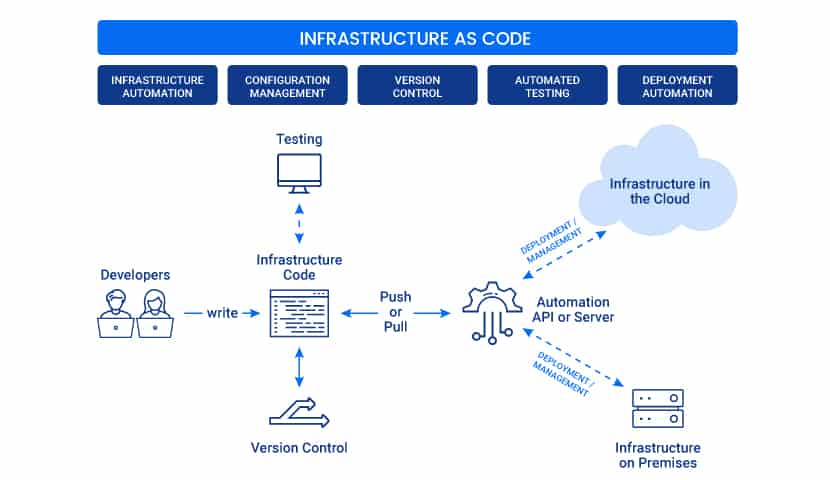
1. Learn about Infrastructure as Code (IaC)
- What to Focus On:
-
- Understand the concept of IaC, how it replaces manual configuration, and why it is critical for modern infrastructure.
- Learn about the benefits of IaC, such as consistency, scalability, and version control.
- Compare IaC tools (e.g., Terraform, Ansible, CloudFormation) to understand Terraform’s unique strengths (e.g., declarative syntax, multi-cloud support).
2. Watch Introductory Videos on Terraform
- What to Focus On:
-
- Terraform’s role in infrastructure management, what problems it solves, and its key features (e.g., provisioning, state management, provider ecosystem).
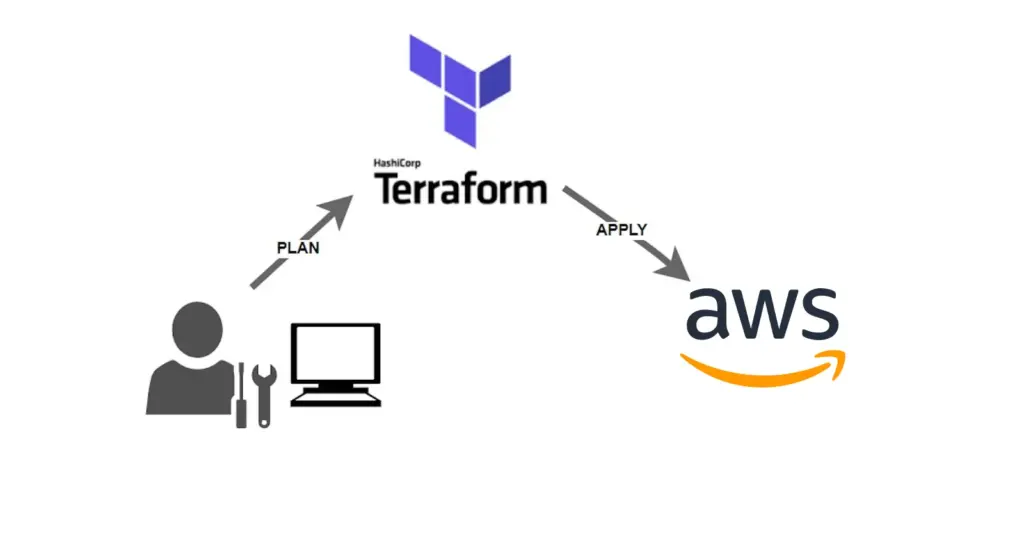
- High-level overview of Terraform’s workflow: Write → Plan → Apply.
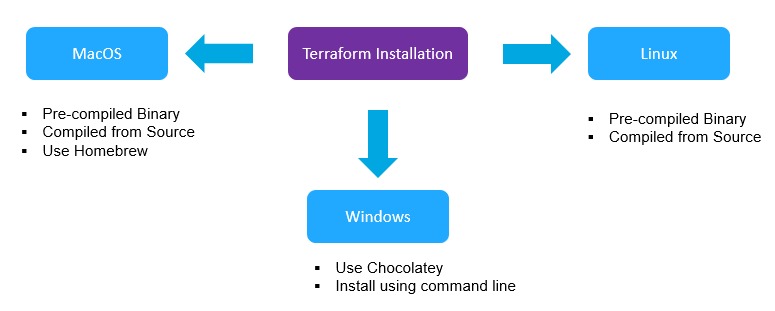
3. Install Terraform on Your Local Machine
- What to Focus On:
-
- Learn how to set up Terraform to start experimenting with configurations.
- Get familiar with basic CLI commands (terraform version, terraform init).
Resources:
- Blog: Terraform Installation
Additional Resources (Not Part of Certification):
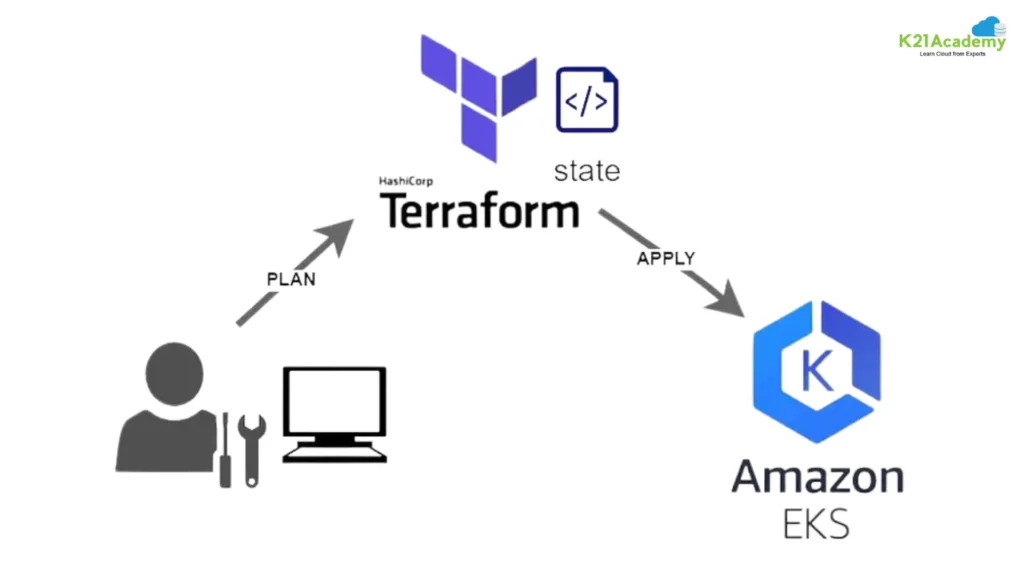
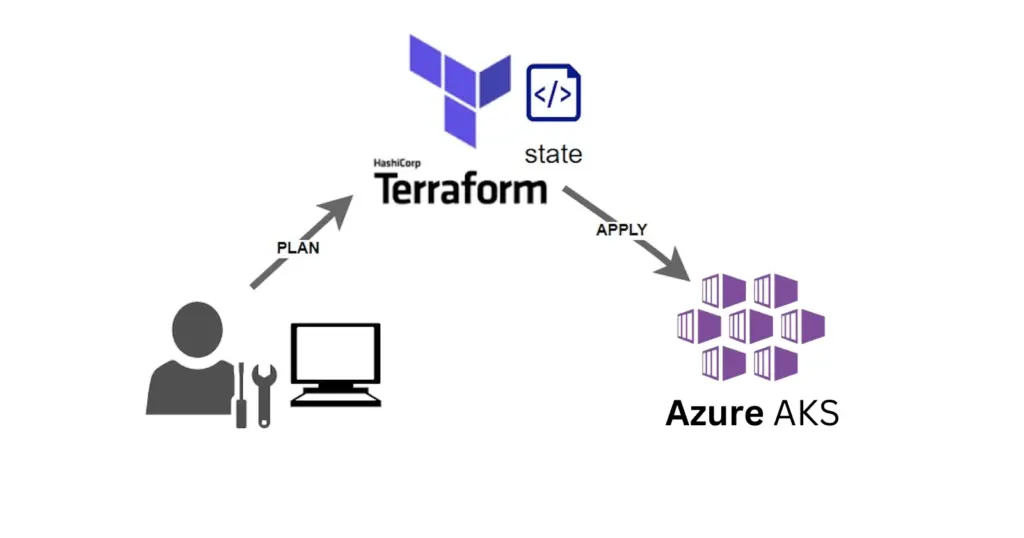
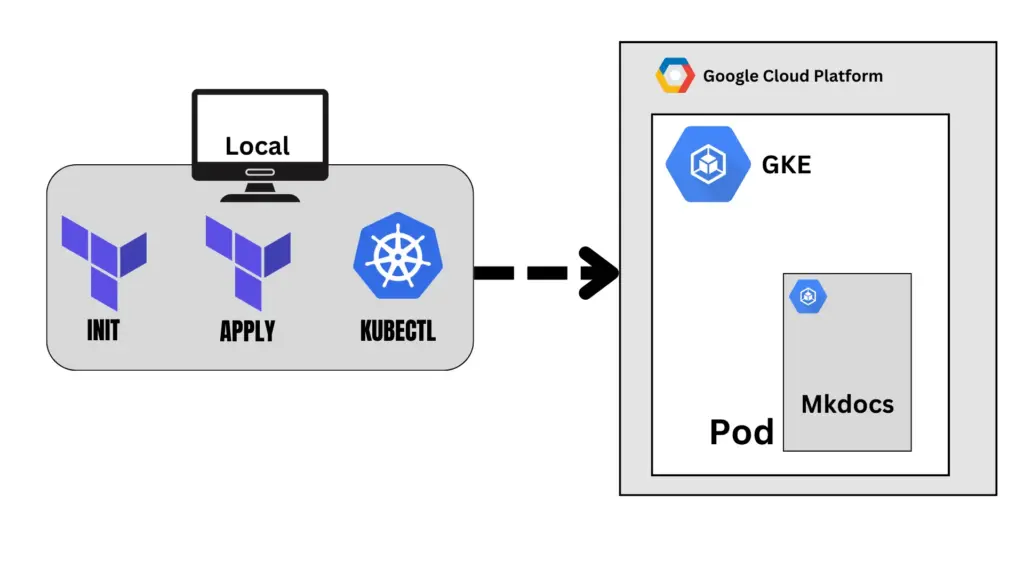
Practice Questions:
Question 1:
What is Terraform primarily used for?
A) Container orchestration
B) Configuration management
C) Infrastructure provisioning
D) Application deployment
Answer: C) Infrastructure provisioning
Explanation: Terraform is an Infrastructure as Code (IaC) tool that allows you to define and provision infrastructure resources such as virtual machines, networks, and storage.
Question 2:
What language does Terraform use for configuration files?
A) YAML
B) HCL (HashiCorp Configuration Language)
C) JSON
D) XML
Answer: B) HCL (HashiCorp Configuration Language)
Explanation: Terraform uses HCL, designed to be human-readable and specific to Terraform. JSON is also supported but is less commonly used.
Question 3:
Which of the following is a core component of Terraform?
A) Orchestration engine
B) State file
C) Build Pipeline
D) Load balancer
Answer: B) State file
Explanation: The state file tracks the real-time state of Terraform’s infrastructure and is essential for operations like updates or deletions.
Question 4:
Is Terraform a declarative or imperative tool?
A) Declarative
B) Imperative
Answer: A) Declarative
Explanation: Terraform uses a declarative approach. You define the desired state of infrastructure, and Terraform figures out how to achieve it.
Question 5:
What command is used to initialize a new or existing Terraform configuration?
A) terraform apply
B) terraform init
C) terraform plan
D) terraform validate
Answer: B) terraform init
Explanation: terraform init is used to initialize a working directory containing Terraform configuration files. It downloads providers and sets up the backend.
Day 2: Basic Terraform Workflow
Objective: Learn the basic workflow: Write, Plan, Apply.
Action Plan:
1. Understand the Core Commands:
- What to Focus On:
- terraform init: Understand how to initialize a working directory and download provider plugins.
- terraform plan: Learn how this command creates an execution plan without making infrastructure changes.
- terraform apply: Understand how to apply the planned changes to the infrastructure.
2. Create a Simple Configuration File:
- What to Focus On:
- Write a basic configuration file to provision an AWS EC2 instance (use the free tier).
- Learn about resource blocks, provider blocks, and basic attributes.
3. Test Your Configuration:
- What to Focus On:
- Ensure the EC2 instance is successfully created.
- Understand the output of each command (e.g., execution plan, changes applied).
Resources:
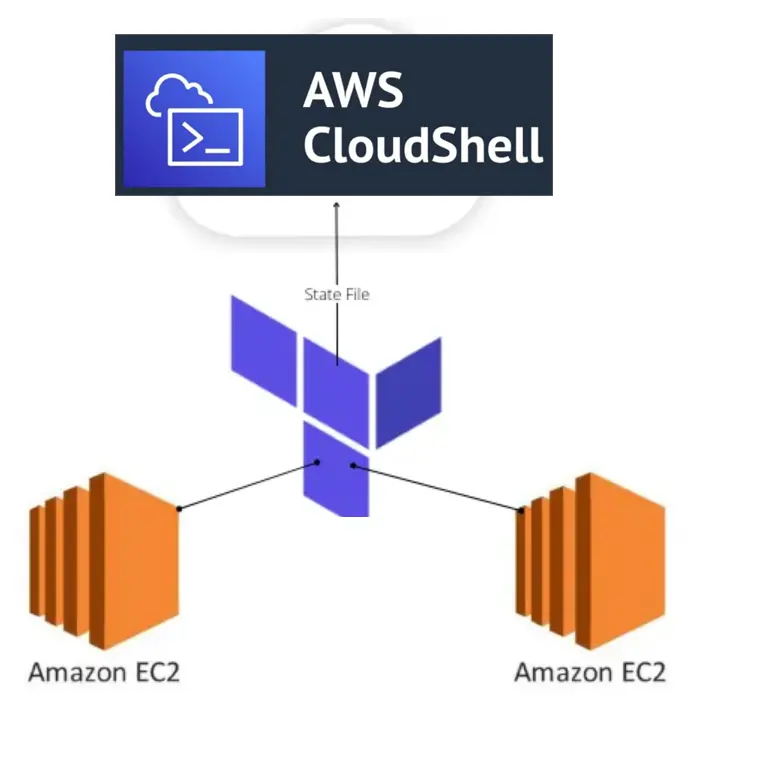
- Blog: Terraform Basics
Practice Questions:
Question 1:
Which of the following is required to install Terraform on a system?
A) Docker
B) HashiCorp’s binary package
C) Java Runtime Environment
D) Python
Answer: B) HashiCorp’s binary package
Explanation: Terraform is distributed as a single binary file that can be downloaded from HashiCorp’s official website or other sources.
Question 2:
How do you verify the installed version of Terraform?
A) terraform check
B) terraform –version
C) terraform validate
D) terraform verify
Answer: B) terraform –version
Explanation: The terraform –version command checks and displays the installed Terraform version.
Question 3:
What does the terraform init command do when setting up Terraform?
A) Runs all configurations
B) Downloads required provider plugins
C) Validates configuration syntax
D) Applies the infrastructure
Answer: B) Downloads required provider plugins
Explanation: terraform init sets up the working directory by downloading provider plugins and initializing backend configurations.
Question 4:
Which file should never be committed to a version control system?
A) main.tf
B) terraform.tfvars
C) terraform.tfstate
D) variables.tf
Answer: C) terraform.tfstate
Explanation: The terraform.tfstate file contains sensitive information like resource attributes and should not be committed to version control for security reasons.
Question 5:
What is the best practice when defining provider versions in a configuration?
A) Use the latest version always.
B) Do not specify the provider version.
C) Specify the provider version explicitly or with constraints.
D) Use a beta provider version.
Answer: C) Specify the provider version explicitly or with constraints.
Explanation: Specifying provider versions ensures consistent and predictable behavior of Terraform configurations.
Day 3: Terraform Configuration Syntax
Objective: Learn about HCL (HashiCorp Configuration Language).
Action Plan::
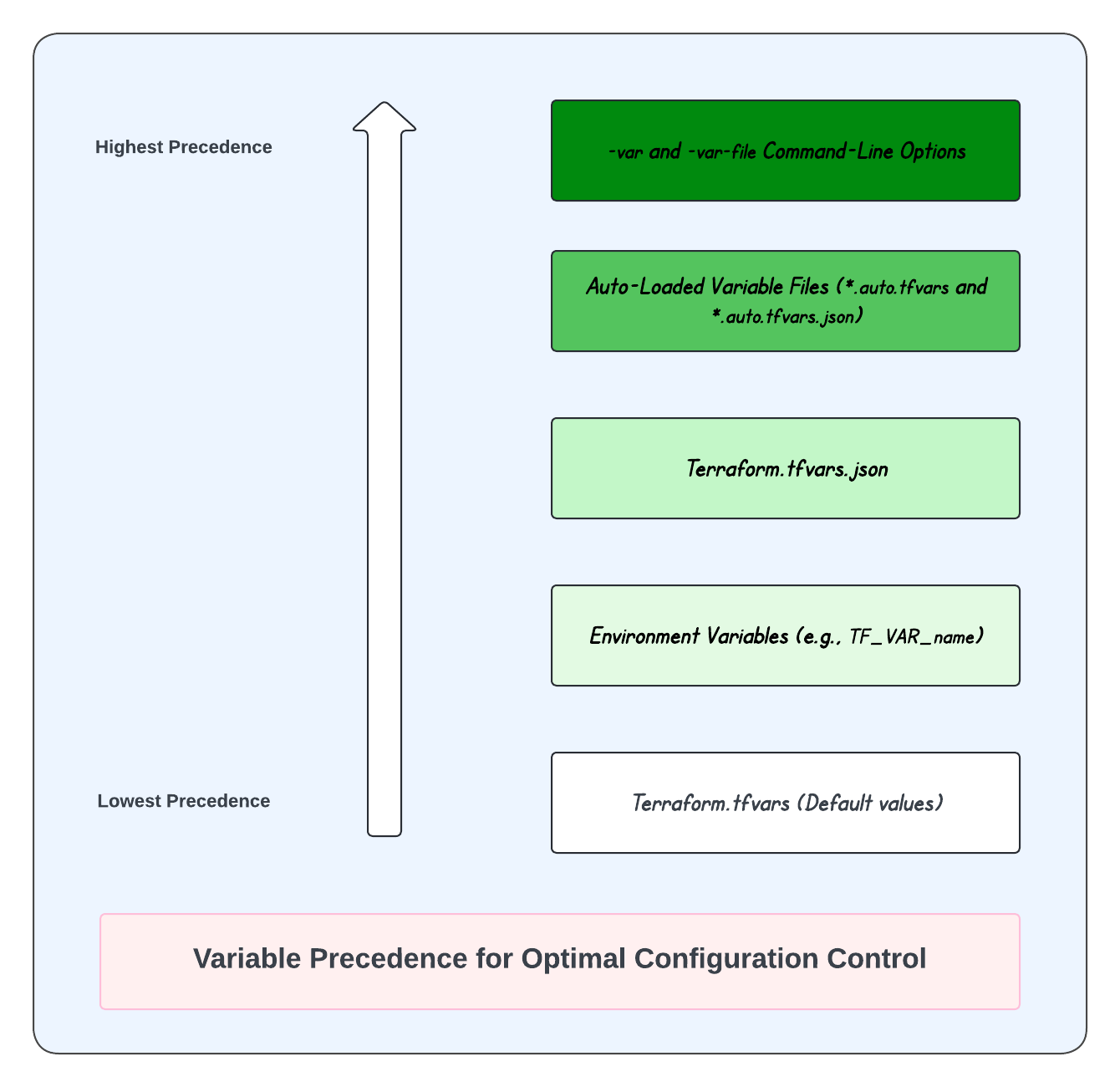
- Understand variables, outputs, and providers.
- Practice creating variables in configuration files.
Resources:
Practice Questions:
Question 1:
Which file extension is used for Terraform configuration files?
A) .yaml
B) .tf
C) .json
D) .config
Answer: B) .tf
Explanation: Terraform configuration files use the .tf extension to store the infrastructure code.
Question 2:
What block is required in every Terraform configuration file?
A) provider
B) resource
C) data
D) None of the above
Answer: A) provider
Explanation: A provider block is mandatory to define the infrastructure provider (e.g., AWS, Azure) that Terraform will interact with.
Question 3:
Can multiple .tf files be used in a single directory?
A) Yes
B) No
Answer: A) Yes
Explanation: Terraform automatically combines all .tf files in a directory into a single configuration.
Question 4:
What is the purpose of the variable block?
A) To store dynamic inputs for configurations
B) To define resources
C) To configure providers
D) To run commands
Answer: A) To store dynamic inputs for configurations
Explanation: Variables allow users to input values dynamically into Terraform configurations.
Question 5:
Which of the following is NOT a valid Terraform provider?
A) AWS
B) Azure
C) Kubernetes
D) Java
Answer: D) Java
Explanation: Providers are integrations that Terraform uses to manage infrastructure resources. Java is not a provider.
Day 4: Providers and Resources
Objective: Understand the role of providers and resources in Terraform.
Action Plan:
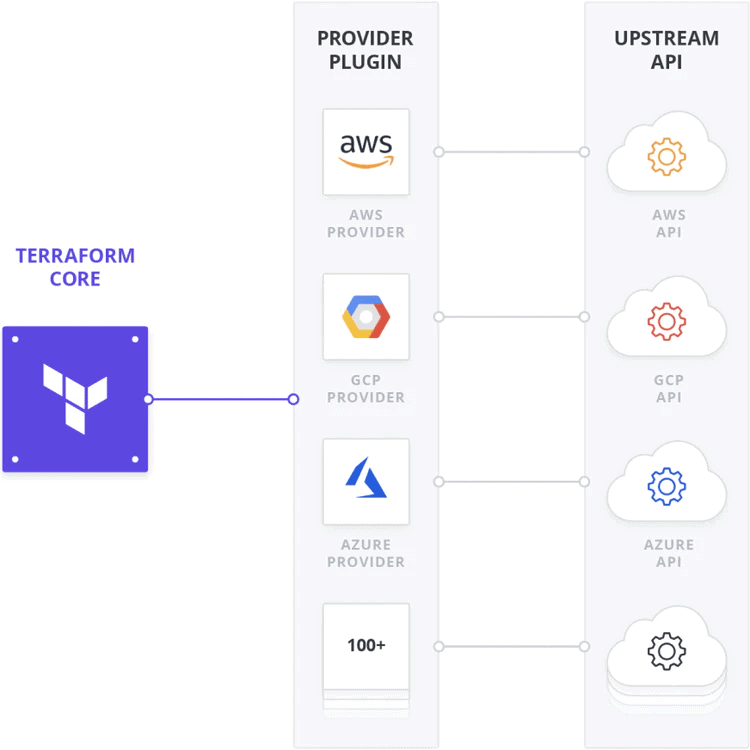
- Learn about AWS as a provider.
- Practice writing resource configurations for AWS services.
Resources:
Practice Questions:
Question 1:
What is a provider in Terraform?
A) A reusable set of configurations
B) A plugin that enables Terraform to interact with APIs for resource management
C) A Terraform configuration validator
D) A way to organize state files
Answer: B) A plugin that enables Terraform to interact with APIs for resource management
Explanation: Providers are plugins that allow Terraform to manage infrastructure resources by interacting with the APIs of specific platforms like AWS, Azure, or GCP.
Question 2:
What is required to configure a provider in Terraform?
A) A provider block
B) A resource block
C) A module block
D) A variable block
Answer: A) A provider block
Explanation: The provider block is required to specify the infrastructure platform (e.g., AWS, Azure) and any necessary configurations like credentials or region settings.
Question 3:
What does a resource block represent in Terraform?
A) A connection to a provider
B) A single piece of infrastructure managed by Terraform
C) A backend configuration
D) A reusable module
Answer: B) A single piece of infrastructure managed by Terraform
Explanation: Resources represent actual infrastructure components, such as virtual machines, storage buckets, or networking rules, that Terraform will manage.
Question 4:
Which of the following is NOT an example of a valid resource block?
A) resource “aws_instance” “example” {}
B) resource “google_compute_instance” “example” {}
C) resource “azurerm_virtual_machine” “example” {}
D) resource “terraform_provider” “example” {}
Answer: D) resource “terraform_provider” “example” {}
Explanation: There is no such thing as a terraform_provider resource. Resources must correspond to actual infrastructure objects supported by the provider, such as aws_instance or google_compute_instance.
Question 5:
How do providers authenticate Terraform to manage resources?
A) Using the output block
B) Using access keys, tokens, or environment variables
C) Automatically through Terraform CLI
D) By writing configurations in the terraform.tfstate file
Answer: B) Using access keys, tokens, or environment variables
Explanation: Providers use credentials, typically passed via access keys, tokens, or environment variables, to authenticate Terraform with the target platform.
Day 5: Terraform State
Objective: Learn about Terraform State and its importance.
Action Plan:
- Understand the terraform.tfstate file and its purpose.
- Explore state commands: terraform state list, terraform state show.
- Practice using state commands on your configurations.
Resources:
- Blog: Managing Terraform State

Practice Questions:
Question 1:
What is the purpose of the Terraform state file?
A) To store reusable modules
B) To track the current state of infrastructure managed by Terraform
C) To generate provider configurations
D) To validate configuration files
Answer: B) To track the current state of infrastructure managed by Terraform
Explanation: The state file (terraform.tfstate) acts as a mapping between the Terraform configuration and the real-world resources it manages. It is critical for updates, deletes, and creating new resources.
Question 2:
Where is the Terraform state file stored by default?
A) In the .terraform directory
B) In the working directory where Terraform is run
C) On the Terraform Cloud platform
D) In the provider’s API
Answer: B) In the working directory where Terraform is run
Explanation: By default, the state file is stored locally in the same directory where Terraform is executed. However, it can be configured to use remote backends for storage.
Question 3:
Why should you avoid manually editing the terraform.tfstate file?
A) It is encrypted and cannot be modified.
B) Manual edits can corrupt the state file and cause inconsistencies in the infrastructure.
C) The file does not support changes until Terraform is re-initialized.
D) Terraform will ignore any manual edits.
Answer: B) Manual edits can corrupt the state file and cause inconsistencies in the infrastructure.
Explanation: The state file is critical for Terraform’s operations. Manual changes can introduce errors that Terraform cannot reconcile, leading to unpredictable behavior.
Question 4:
Which command is used to inspect the current state in Terraform?
A) terraform init
B) terraform validate
C) terraform state list
D) terraform show
Answer: C) terraform state list
Explanation: The terraform state list command is used to list all resources tracked in the current state file, helping users inspect the existing infrastructure managed by Terraform.
Question 5:
What is a recommended best practice for managing Terraform state files?
A) Always store them in the same directory as the configuration files.
B) Commit them to a version control system like Git.
C) Use remote backends for shared and secure state management.
D) Encrypt them using a local script.
Answer: C) Use remote backends for shared and secure state management.
Explanation: Remote backends, such as S3 with encryption or Terraform Cloud, are recommended for shared environments to enable collaboration, secure storage, and state locking to prevent conflicts.
Day 6: Remote State Management
Objective: Understand the concept and benefits of a remote state.
Action Plan:
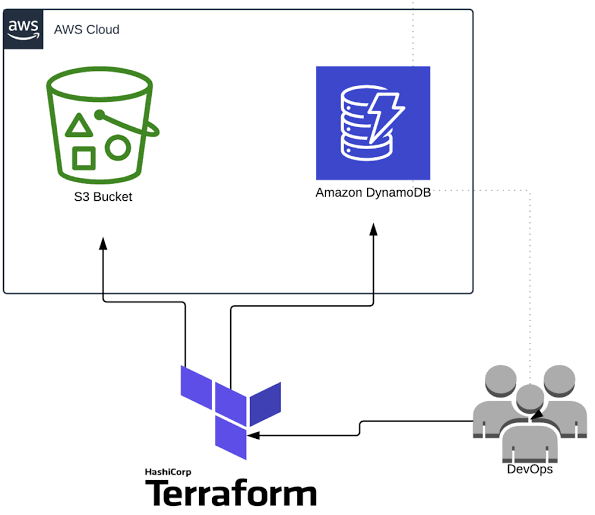
- Learn how to configure remote state storage using AWS S3.
- Enable state locking with DynamoDB.
Resources:
- Blog: Remote State Management
Practice Questions:
Question 1:
What is the primary benefit of using remote state management in Terraform?
A) Faster execution of Terraform commands
B) Enhanced collaboration and state consistency across teams
C) Automatic generation of provider configurations
D) Reduced configuration complexity
Answer: B) Enhanced collaboration and state consistency across teams
Explanation: Remote state management allows multiple team members to access and manage the same state file while avoiding conflicts and ensuring consistency through state locking.
Question 2:
Which of the following can be used as a backend for remote state storage?
A) AWS S3
B) HashiCorp Consul
C) Terraform Cloud
D) All of the above
Answer: D) All of the above
Explanation: Terraform supports multiple remote backends for state storage, including S3, Consul, Terraform Cloud, Azure Blob Storage, and more.
Question 3:
What mechanism is used by remote state backends to prevent multiple users from modifying the state file simultaneously?
A) State merging
B) State validation
C) State locking
D) State encryption
Answer: C) State locking
Explanation: Remote backends implement state locking to prevent concurrent modifications to the state file, ensuring integrity and avoiding conflicts during operations.
Question 4:
How do you configure a remote backend for state management in Terraform?
A) By defining the backend block in the terraform.tfstate file
B) By using the backend block in the Terraform configuration file
C) By running terraform backend-config
D) By using a resource block
Answer: B) By using the backend block in the Terraform configuration file
Explanation: The backend block specifies the type and configuration of the remote backend where Terraform will store the state file.
Question 5:
Which of the following is NOT a valid reason to use a remote state?
A) Securing sensitive information using encryption in remote storage
B) Supporting collaboration in distributed teams
C) Improving Terraform’s ability to generate resource graphs
D) Automating state backups
Answer: C) Improving Terraform’s ability to generate resource graphs
Explanation: Remote state does not directly impact Terraform’s ability to generate resource dependency graphs. It is primarily used for collaboration, security, and backup purposes.
Day 7: Modules
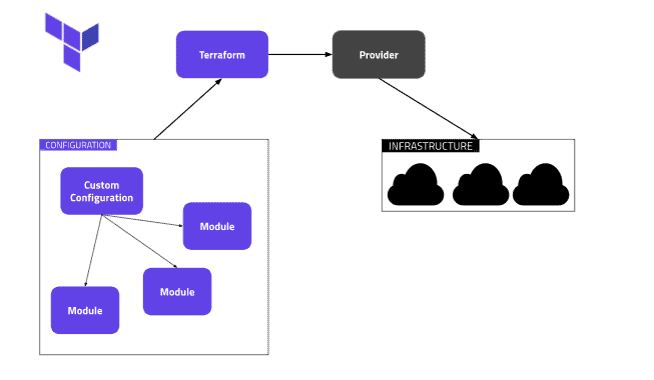
Objective: Learn how to create and use Terraform modules.
Action Plan:
- Create a module for a reusable resource (e.g., EC2 instance).
- Practice using module blocks in configurations.
Resources:
- Blog: Terraform Modules
Practice Questions:
Question 1:
What is a module in Terraform?
A) A resource
B) A reusable set of configurations
C) A state file
D) A provider plugin
Answer: B) A reusable set of configurations
Explanation: Modules are containers for multiple resources that can be reused across different configurations to organize and standardize your infrastructure as code.
Question 2:
How do you call a module in Terraform?
A) module “name” {}
B) resource “module” {}
C) provider “module” {}
D) variable “module” {}
Answer: A) module “name” {}
Explanation: You can call a module using a module block and provide the source of the module (local, remote, or registry) along with input variables.
Question 3:
Can modules be nested in Terraform?
A) Yes
B) No
Answer: A) Yes
Explanation: Modules can call other modules, allowing you to create nested modules to manage complex infrastructure.
Question 4:
Which of the following is NOT a valid source type for a module?
A) Local directory
B) Terraform Cloud
C) Remote Git repository
D) State file
Answer: D) State file
Explanation: Modules can be sourced from local directories, Terraform Cloud, Git repositories, or the Terraform Registry, but not from state files.
Question 5:
What is the primary benefit of using modules in Terraform?
A) Easier debugging
B) Better state management
C) Reusability and organization of infrastructure configurations
D) Faster execution of Terraform commands
Answer: C) Reusability and organisation of infrastructure configurations
Explanation: Modules help improve reusability and allow you to organize infrastructure configurations into logical units, making your code more maintainable and modular.
Day 8: Workspaces
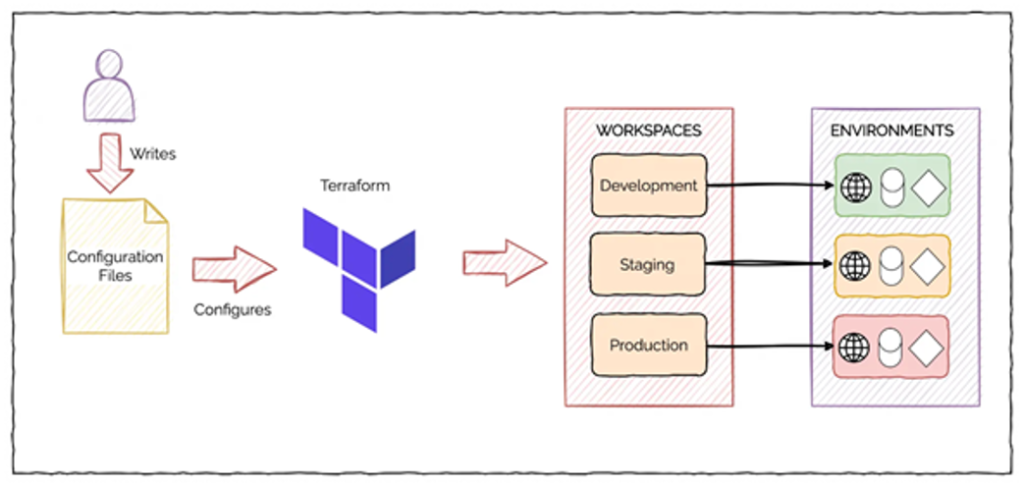
Objective: Learn how to manage multiple environments using workspaces.
Action Plan:
- Understand the purpose of workspaces in Terraform.
- Create and switch between different workspaces (e.g., dev, prod).
- Practice isolating configurations for separate environments.
Resources:
- Blog: Terraform Workspaces
Practice Questions:
Question 1:
What is the purpose of Terraform workspaces?
A) To manage infrastructure state files for multiple environments within the same configuration
B) To reuse modules across multiple Terraform projects
C) To collaborate with multiple users in real-time
D) To store provider credentials securely
Answer: A) To manage infrastructure state files for multiple environments within the same configuration
Explanation: Workspaces allow you to maintain separate state files within a single configuration, often used for managing environments like dev, staging, and production.
Question 2:
What is the default workspace in Terraform?
A) dev
B) default
C) main
D) staging
Answer: B) default
Explanation: Terraform automatically uses a workspace named default unless you explicitly create or switch to another workspace.
Question 3:
How do you list all available workspaces?
A) terraform workspace show
B) terraform workspace list
C) terraform workspace get
D) terraform workspace switch
Answer: B) terraform workspace list
Explanation: The terraform workspace list command lists all workspaces available in the current configuration.
Question 4:
Can Terraform workspaces be used to manage different regions within the same provider?
A) Yes
B) No
Answer: A) Yes
Explanation: Workspaces can be used for multiple purposes, including managing different regions, by isolating their state files.
Question 5:
Which command is used to switch between workspaces in Terraform?
A) terraform workspace use <name>
B) terraform workspace switch <name>
C) terraform workspace select <name>
D) terraform workspace create <name>
Answer: A) terraform workspace use <name>
Explanation: The terraform workspace use <name> command switches to the specified workspace.
Day 9: Provisioners
Objective: Understand what provisioners are and how they are used in Terraform.
Action Plan:
- Learn about provisioners like local-exec and remote-exec.
- Use provisioners to run scripts during resource creation or destruction.
Resources:
- Blog: Terraform Provisioners

Practice Questions:
Question 1:
What is the main purpose of a provisioner in Terraform?
A) To create new infrastructure resources
B) To configure or execute scripts on a resource after it is created
C) To validate Terraform configurations
D) To store remote state
Answer: B) To configure or execute scripts on a resource after it is created
Explanation: Provisioners are used to perform actions (like running scripts) on resources after their creation or before their destruction.
Question 2:
Which of the following provisioners is built into Terraform?
A) local-exec
B) remote-exec
C) Both A and B
D) None
Answer: C) Both A and B
Explanation: Terraform supports the local-exec and remote-exec provisioners for executing scripts locally or on a remote resource.
Question 3:
Why should provisioners be used sparingly?
A) They increase resource costs.
B) They can introduce state dependencies and make configurations less predictable.
C) They require separate installation.
D) They are not compatible with Terraform state.
Answer: B) They can introduce state dependencies and make configurations less predictable.
Explanation: Provisioners can create dependencies outside Terraform’s control, making it harder to maintain infrastructure as code principles.
Question 4:
What happens if a provisioner fails during a terraform apply?
A) Terraform will skip the provisioner and continue applying resources.
B) Terraform will roll back the resource.
C) Terraform will stop and mark the resource as tainted.
D) Terraform will automatically retry the provisioner.
Answer: C) Terraform will stop and mark the resource as tainted.
Explanation: If a provisioner fails, Terraform marks the resource as tainted, meaning it will be destroyed and recreated on the next apply.
Question 5:
Which of the following is NOT a valid provisioner?
A) file
B) null
C) local-exec
D) remote-exec
Answer: B) null
Explanation: There is no null provisioner. Valid provisioners include local-exec, remote-exec, and file.
Day 10: Data Sources
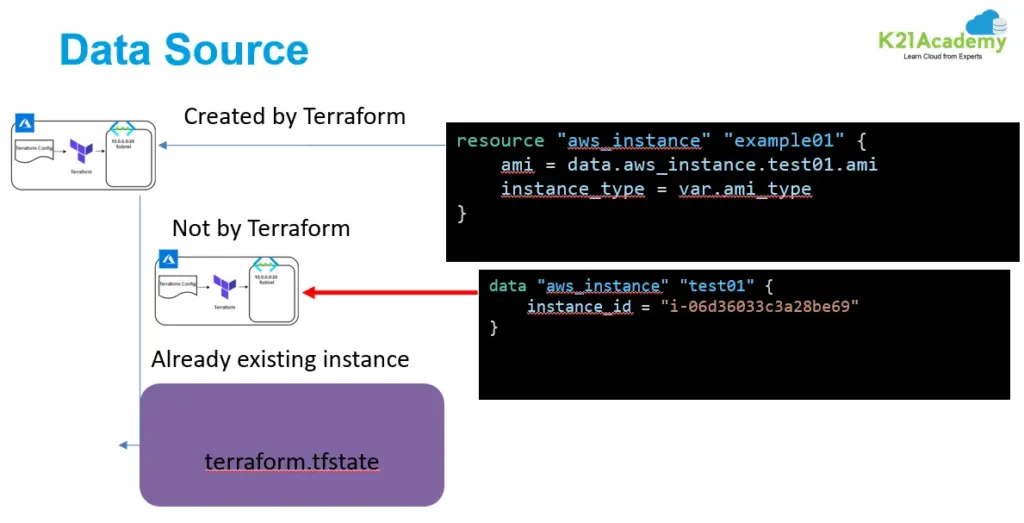
Objective: Learn how to use data sources to query existing infrastructure.
Action Plan:
- Use a data source to retrieve existing resources.
- Understand the syntax for data blocks.
Resources:
- Blog: Terraform Data Sources
Practice Questions:
Question 1:
What is a data source in Terraform?
A) A way to create new resources
B) A mechanism to query existing information outside Terraform
C) A way to store backend configurations
D) A feature to execute provisioners
Answer: B) A mechanism to query existing information outside Terraform
Explanation: Data sources allow Terraform to fetch data from external sources, such as existing resources in a cloud provider.
Question 2:
What block is used to configure a data source?
A) provider
B) resource
C) data
D) variable
Answer: C) data
Explanation: The data block is used to define a data source in Terraform.
Question 3:
Can data sources be used as input to resources?
A) Yes
B) No
Answer: A) Yes
Explanation: Data sources can provide dynamic inputs to resources, allowing resources to depend on external data.
Question 4:
Which of the following is a valid example of a data source in Terraform?
A) resource “aws_instance” “example” {}
B) data “aws_ami” “example” {}
C) provider “aws” {}
D) module “example” {}
Answer: B) data “aws_ami” “example” {}
Explanation: The data block defines a data source, such as fetching information about an AWS AMI.
Question 5:
What happens if a data source fails during terraform apply?
A) Terraform skips it and proceeds.
B) Terraform throws an error and stops execution.
C) Terraform creates a placeholder resource.
D) Terraform retries until it succeeds.
Answer: B) Terraform throws an error and stops execution.
Explanation: Data source failures halt Terraform operations to prevent misconfigurations.
Day 11: Debugging and Logging
Objective: Learn how to debug and troubleshoot Terraform configurations.
Action Plan:
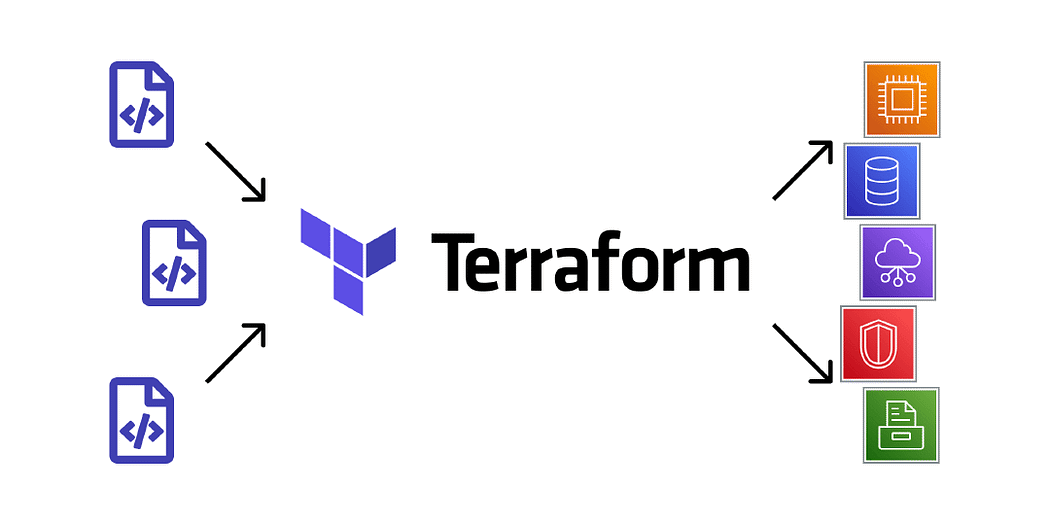
- Use the TF_LOG environment variable for debugging.
- Understand Terraform error messages and their resolution.
Resources:
- Blog: Debugging in Terraform
Practice Questions:
Question 1:
Which command can be used to debug Terraform configurations by showing the output of a specific plan?
A) terraform validate
B) terraform debug
C) terraform plan
D) terraform apply
Answer: C) terraform plan
Explanation: The terraform plan command provides detailed information on what changes will be made, making it useful for debugging issues before applying changes.
Question 2:
What environment variable should be set to enable detailed debug logs in Terraform?
A) TF_VAR_DEBUG
B) TF_LOG
C) TERRAFORM_LOG
D) TF_STATE_DEBUG
Answer: B) TF_LOG
Explanation: The TF_LOG environment variable enables logging in Terraform. Its values can range from TRACE (most detailed) to ERROR (least detailed).
Question 3:
How can you save Terraform debug logs to a file?
A) By using the –log flag
B) By setting the TF_LOG_PATH environment variable
C) By redirecting the output of terraform apply
D) By enabling log storage in the provider configuration
Answer: B) By setting the TF_LOG_PATH environment variable
Explanation: The TF_LOG_PATH variable specifies the file where Terraform writes its log output when debugging is enabled.
Question 4:
What does the terraform validate command do?
A) Executes a plan and checks for errors in resources
B) Validates the Terraform configuration for syntax and logical errors
C) Checks the provider’s API for compatibility
D) Validates existing state files
Answer: B) Validates the Terraform configuration for syntax and logical errors
Explanation: The terraform validate command checks the configuration files for syntax issues and ensures they are ready to be used.
Question 5:
If Terraform throws an error, which flag can you add to get more detailed output during a command?
A) –trace
B) –verbose
C) –debug
D) None of the above
Answer: D) None of the above
Explanation: Terraform does not have these flags. Instead, you enable debug logs by setting TF_LOG to TRACE or another log level.
Day 12: Advanced HCL Syntax
Objective: Master advanced HCL constructs like loops and conditionals.
Action Plan:
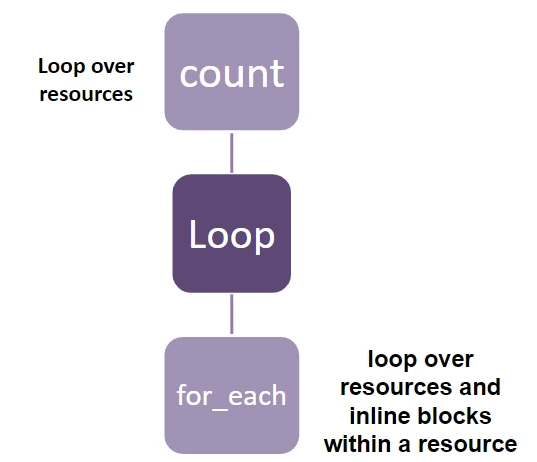
- Use count and for_each in resource blocks.
- Practice conditionals using the if statement.
Resources:
Practice Questions:
Question 1:
What HCL construct is used to create a list of resources dynamically?
A) for_each
B) dynamic
C) count
D) loop
Answer: A) for_each
Explanation: The for_each construct creates multiple resources dynamically from a map or a set.
Question 2:
What does the count parameter do in a resource block?
A) Specifies the number of times a resource should be created
B) Dynamically names the resource block
C) Assigns input variables to a resource
D) Deletes the resource
Answer: A) Specifies the number of times a resource should be created
Explanation: The count parameter determines how many instances of a resource to create.
Question 3:
How are conditional expressions written in HCL?
A) condition ? true_action : false_action
B) if (condition) { true_action } else { false_action }
C) true_action if condition else false_action
D) condition ? false_action : true_action
Answer: A) condition ? true_action : false_action
Explanation: HCL uses the ternary operator syntax for conditionals.
Question 4:
What is the purpose of the dynamic block in Terraform?
A) To create resources dynamically based on conditions
B) To dynamically generate resource arguments or nested blocks
C) To handle provider dependencies dynamically
D) To modify the backend configuration
Answer: B) To dynamically generate resource arguments or nested blocks
Explanation: The dynamic block is used when resource arguments or nested blocks need to be generated programmatically.
Question 5:
Which of the following is NOT valid in HCL?
A) for expressions
B) if statements
C) count loops
D) for_each
Answer: B) if statements
Explanation: HCL does not have if statements; it uses conditional expressions (condition ? true_action : false_action) instead.
Day 13: Dynamic Blocks
Objective: Learn how to use dynamic blocks to simplify configurations.
Action Plan:
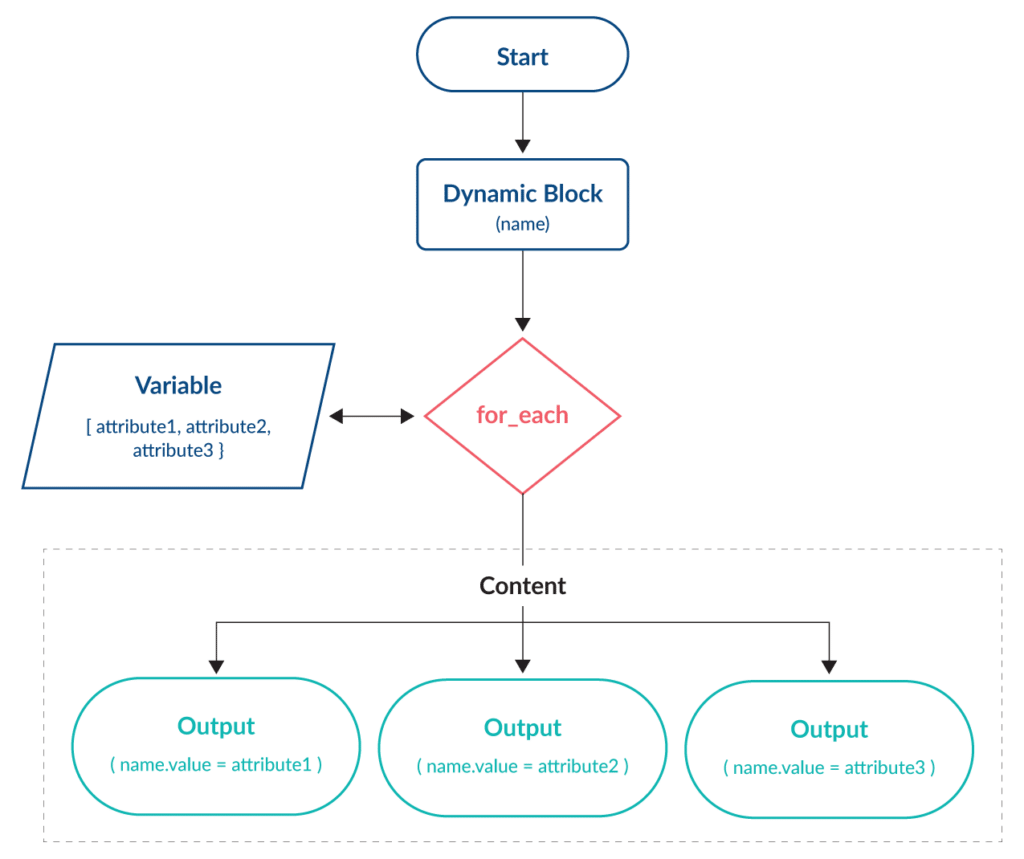
- Use a dynamic block to generate nested configurations.
- Practice using dynamic blocks with loops.
Resources:
- Blog: Terraform Dynamic Blocks
Practice Questions:
Question 1:
What is the primary purpose of a dynamic block in Terraform?
A) To create multiple resources dynamically
B) To generate resource arguments or nested blocks based on input variables
C) To define provider configurations dynamically
D) To manage remote state
Answer: B) To generate resource arguments or nested blocks based on input variables
Explanation: Dynamic blocks allow for the conditional and programmatic generation of nested resource blocks.
Question 2:
Which argument is required in a dynamic block?
A) for_each
B) iterator
C) content
D) Both A and C
Answer: D) Both A and C
Explanation: A dynamic block must have a for_each expression and a content block that defines the structure of the nested arguments.
Question 3:
How does Terraform iterate through items in a dynamic block?
A) Automatically iterates all resources in the state file
B) By using the iterator keyword or implicit iteration
C) By defining a count parameter
D) Using a for loop
Answer: B) By using the iterator keyword or implicit iteration
Explanation: You can explicitly define an iterator or use the default iteration behaviour of for_each in dynamic blocks.
Question 4:
Can dynamic blocks be nested within other dynamic blocks?
A) Yes
B) No
Answer: A) Yes
Explanation: Nested dynamic blocks are supported, allowing complex configurations to be simplified.
Question 5:
What is the result of an empty for_each expression in a dynamic block?
A) The block generates empty resources
B) The block is ignored
C) Terraform throws an error
D) The block executes with default values
Answer: B) The block is ignored
Explanation: If for_each is empty, Terraform skips generating any nested content for the dynamic block.
Day 14: Terraform CLI Tricks
Objective: Learn advanced Terraform CLI commands and options.
Action Plan:
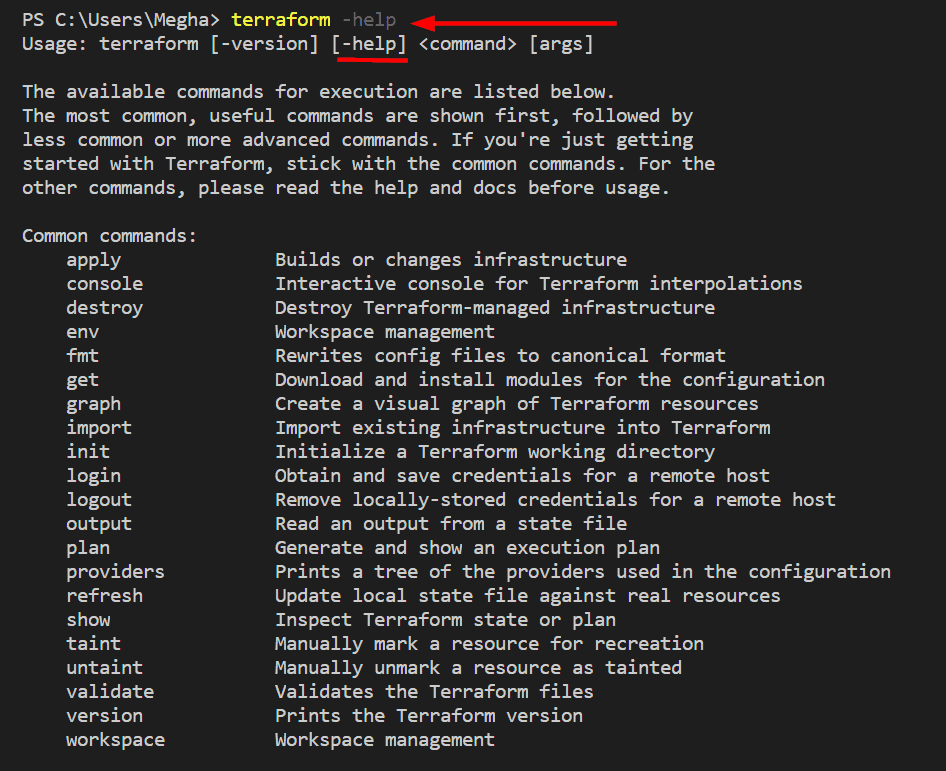
- Use terraform fmt to format code.
- Learn about the terraform taint and terraform untaint commands.
Resources:
Practice Questions:
Question 1:
Which Terraform CLI command can be used to refresh the state file without applying any changes?
A) terraform apply
B) terraform refresh
C) terraform validate
D) terraform state
Answer: B) terraform refresh
Explanation: The terraform refresh command updates the state file to match the current real-world infrastructure without applying any changes.
Question 2:
What does the terraform state mv command do?
A) Moves a resource from one state file to another
B) Moves a resource to a different module within the same state file
C) Deletes a resource from the state file
D) Renames a resource in the configuration file
Answer: B) Moves a resource to a different module within the same state file
Explanation: The terraform state mv command moves resources between modules in the same state file.
Question 3:
How can you see the values stored in Terraform outputs without running terraform apply?
A) terraform output
B) terraform show
C) terraform outputs
D) terraform state output
Answer: A) terraform output
Explanation: The terraform output command displays the values of output variables from the latest state file.
Question 4:
What does the -out flag in the terraform plan command do?
A) Exports the plan to a text file
B) Saves the plan to a binary file that can be applied later
C) Specifies the output format for the plan
D) Outputs the plan to the console in verbose mode
Answer: B) Saves the plan to a binary file that can be applied later
Explanation: The -out flag saves the generated plan to a file, which can then be applied later using terraform apply <file>.
Question 5:
How can you filter specific resources from the Terraform state?
A) By using terraform state filter
B) By using terraform show with arguments
C) By using terraform state list
D) By using terraform state view
Answer: C) By using terraform state list
Explanation: The terraform state list command lists all resources in the state file, and you can filter them using resource names or patterns.
Day 15: Terraform Cloud Basics
Objective: Learn the basics of Terraform Cloud and its benefits.
Action Plan:
- Create a Terraform Cloud account.
- Practice running Terraform from the cloud.
Resources:
- Blog: Terraform Cloud

Practice Questions:
Question 1:
What is Terraform Cloud primarily used for?
A) Managing Terraform plugins
B) Running Terraform commands locally
C) Providing a collaborative environment for managing infrastructure as code
D) Storing Terraform modules
Answer: C) Providing a collaborative environment for managing infrastructure as code
Explanation: Terraform Cloud allows teams to collaborate on infrastructure management, store remote state, and automate workflows.
Question 2:
Which feature of Terraform Cloud provides secure storage for sensitive data like API keys?
A) Remote state
B) Variables
C) Workspaces
D) Terraform Enterprise
Answer: B) Variables
Explanation: Terraform Cloud allows you to define variables, including sensitive ones, and securely encrypts and stores them.
Question 3:
What is the default workspace in Terraform Cloud?
A) production
B) default
C) dev
D) staging
Answer: B) default
Explanation: The default workspace is always created when a new Terraform Cloud workspace is set up.
Question 4:
Which Terraform Cloud plan enables policy enforcement using Sentinel?
A) Free
B) Team
C) Team & Governance
D) Enterprise
Answer: C) Team & Governance
Explanation: Policy enforcement via Sentinel is available in the Team & Governance and Enterprise plans of Terraform Cloud.
Question 5:
How does Terraform Cloud handle state files?
A) It stores them locally on user machines.
B) It stores them on the Terraform Cloud servers.
C) It requires integration with external storage like S3.
D) It does not support state management.
Answer: B) It stores them on the Terraform Cloud servers.
Explanation: Terraform Cloud automatically manages and stores state files securely on its platform.
Day 16: Remote State Management
Objective: Learn how to manage Terraform state remotely for team collaboration.
Action Plan:
- Configure a remote backend like S3 or Azure Blob Storage.
- Practice locking the state file using a remote backend.
Resources:

Practice Questions:
Question 1:
What is a benefit of remote state management in Terraform?
A) Faster execution of Terraform commands
B) Enhanced collaboration by sharing state across team members
C) Easier debugging of HCL configurations
D) Simplified provider configuration
Answer: B) Enhanced collaboration by sharing state across team members
Explanation: Remote state allows teams to share and update the state file centrally, preventing conflicts during collaborative work.
Question 2:
Which backend is NOT supported for remote state management?
A) AWS S3
B) Azure Blob Storage
C) Google Cloud Storage
D) MySQL
Answer: D) MySQL
Explanation: Terraform supports several backends for remote state management, such as S3, Azure, and GCS, but not databases like MySQL.
Question 3:
What file is used to configure the backend for remote state in Terraform?
A) terraform.tfstate
B) backend.tf
C) terraform.tfvars
D) main.tf
Answer: D) main.tf
Explanation: Backends are typically defined in the main configuration file (main.tf) or any .tf file in the root directory.
Question 4:
How do you initialise a backend for remote state?
A) By running terraform backend
B) By running terraform init
C) By creating a backend.tf file
D) By running terraform apply
Answer: B) By running terraform init
Explanation: The terraform init command is used to initialise a backend for remote state.
Question 5:
What happens if the remote state file is locked by another user?
A) Terraform will overwrite the lock.
B) Terraform will wait until the lock is released.
C) Terraform will generate a new state file.
D) Terraform will throw an error and stop execution.
Answer: D) Terraform will throw an error and stop execution.
Explanation: Terraform ensures consistency by locking the state file during operations. If another user holds the lock, an error is thrown.
Day 17: Resource Lifecycle Management
Objective: Learn how to control the lifecycle of resources.
Action Plan:
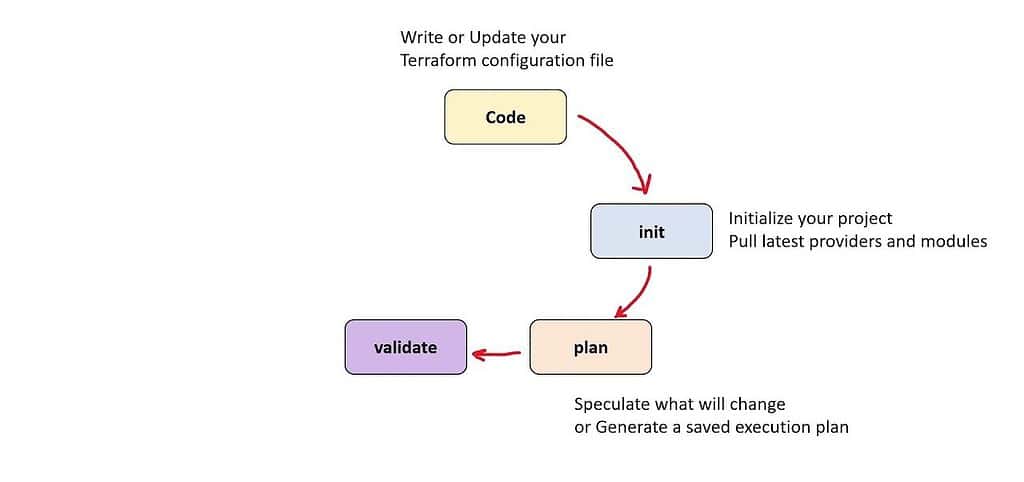
- Use the lifecycle block to configure resource behavior.
- Practice using create_before_destroy and prevent_destroy.
Resources:
Practice Questions:
Question 1:
What is the purpose of the lifecycle block in a Terraform resource?
A) To manage dependencies between resources
B) To define meta-arguments for resource lifecycle behaviour
C) To delete unused resources automatically
D) To schedule resource creation
Answer: B) To define meta-arguments for resource lifecycle behaviour
Explanation: The lifecycle block is used to define meta-arguments such as create_before_destroy, prevent_destroy, and ignore_changes that control resource behaviour during updates.
Question 2:
What does the prevent_destroy argument in the lifecycle block do?
A) Automatically recreates the resource if it is destroyed
B) Prevents accidental deletion of the resource
C) Prevents changes to the resource
D) Ignores resource creation errors
Answer: B) Prevents accidental deletion of the resource
Explanation: The prevent_destroy argument prevents Terraform from destroying the resource, even when explicitly applied.
Question 3:
Which argument ensures that a new resource is created before the old one is destroyed?
A) prevent_destroy
B) ignore_changes
C) create_before_destroy
D) force_replace
Answer: C) create_before_destroy
Explanation: The create_before_destroy argument ensures that the new resource is created first to avoid downtime or configuration errors.
- Question 4:
How can you ignore updates to a specific attribute of a resource?
A) Use the prevent_destroy argument
B) Use the ignore_changes argument in the lifecycle block
C) Use the depends_on argument
D) Use a null resource
Answer: B) Use the ignore_changes argument in the lifecycle block
Explanation: The ignore_changes argument is used to tell Terraform to ignore updates to specific attributes during the apply phase.
- Question 5:
What happens when you use the replace_triggered_by argument in a resource?
A) It prevents the resource from being destroyed.
B) It ensures the resource is only updated if specific dependencies change.
C) It forces a resource to be replaced when a dependency changes.
D) It deletes unused resources in the state.
Answer: C) It forces a resource to be replaced when a dependency changes.
Explanation: The replace_triggered_by argument allows a resource to be replaced automatically if a dependency it references changes.
Day 18: Importing Existing Resources
Objective: Learn how to import existing infrastructure into Terraform.
Action Plan:
- Use the terraform import command to add existing resources.
- Update the configuration file to match the imported resource.
Resources:
- Blog: Terraform Import Command

Practice Questions:
Question 1:
Which command is used to import existing resources into Terraform?
A) terraform state import
B) terraform import
C) terraform apply –import
D) terraform migrate
Answer: B) terraform import
Explanation: The terraform import command associates existing infrastructure with a Terraform resource in the state file.
Question 2:
What must be present in the Terraform configuration before importing a resource?
A) A matching resource block
B) The resource’s state file
C) The resource’s attributes
D) A provider configuration
Answer: A) A matching resource block
Explanation: Terraform requires the resource block in the configuration to map the existing resource to it during import.
Question 3:
Can you import multiple resources at once using terraform import?
A) Yes, using a wildcard
B) No, it must be done one at a time
C) Yes, using terraform import -batch
D) Only with external scripts
Answer: B) No, it must be done one at a time
Explanation: Terraform only supports importing one resource at a time with the terraform import command.
Question 4:
What happens if you modify the configuration file after importing a resource?
A) Terraform updates the resource in real time.
B) Terraform re-imports the resource automatically.
C) Terraform flags it as “tainted.”
D) Terraform applies the changes during the next terraform apply.
Answer: D) Terraform applies the changes during the next terraform apply.
Explanation: Once the resource is imported, Terraform updates its state file. Any changes to the configuration require running terraform apply to take effect.
Question 5:
Why might you need to manually update the Terraform state after importing a resource?
A) The import command does not save the state file.
B) Imported resources do not include all attributes.
C) Terraform does not track dependencies automatically.
D) The configuration file becomes invalid after import.
Answer: B) Imported resources do not include all attributes.
Explanation: Attributes such as computed fields might not be included during import and may require manual updates to the state file.
Day 19: Terraform Registry
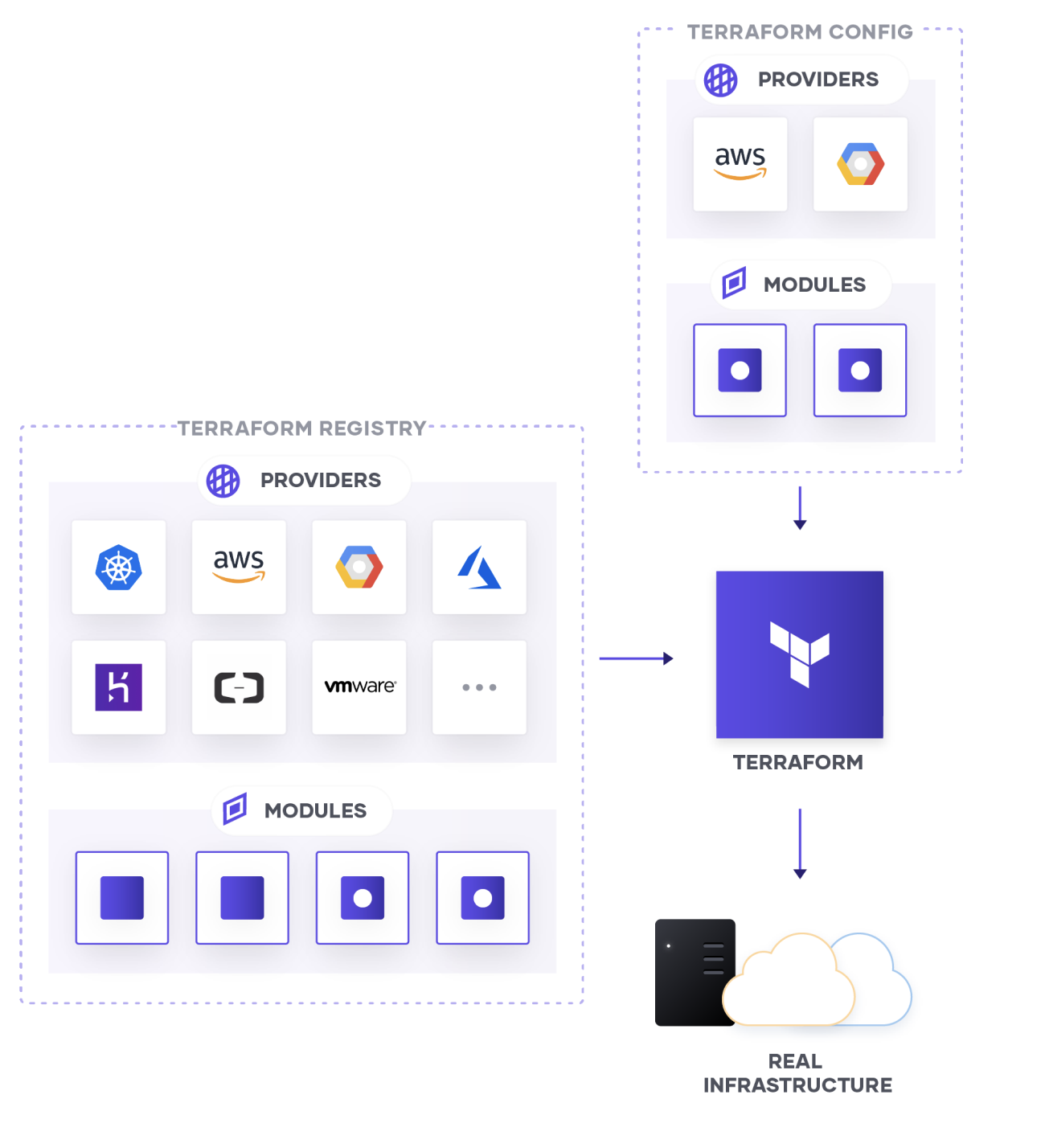
Objective: Learn how to use the Terraform Registry to find and use modules and providers.
Action Plan:
- Explore the Terraform Registry.
- Add a community module to your configuration.
Resources:
- Blog: Using Terraform Registry
Practice Questions:
Question 1:
What does the Terraform Registry primarily provide?
A) Predefined state files for infrastructure
B) A collection of reusable modules and providers
C) A storage solution for remote state
D) A local testing environment for Terraform configurations
Answer: B) A collection of reusable modules and providers
Explanation: The Terraform Registry is an online marketplace for discovering, sharing, and using Terraform modules and providers.
Question 2:
Which command can add a module from the Terraform Registry to your configuration?
A) terraform install
B) terraform get
C) terraform init
D) terraform registry
Answer: C) terraform init
Explanation: When you reference a module in your configuration, running terraform init downloads it from the Terraform Registry.
Question 3:
Which of the following is a valid URL format for a module in the Terraform Registry?
A) registry.terraform.io/<namespace>/<name>/<provider>
B) terraform-registry.com/<name>/<provider>
C) <provider>.registry.io/<module>
D) terraform.io/modules/<namespace>/<name>
Answer: A) registry.terraform.io/<namespace>/<name>/<provider>
Explanation: This is the correct format for referencing a module in the Terraform Registry.
Question 4:
How can you find verified modules in the Terraform Registry?
A) By filtering by the provider
B) By looking for the “Verified” badge
C) By searching for popular modules
D) By using the –verified flag in terraform get
Answer: B) By looking for the “Verified” badge
Explanation: Verified modules in the Terraform Registry display a “Verified” badge, indicating they are maintained by trusted providers or organisations.
Question 5:
What is the advantage of using the Terraform Registry for modules?
A) Modules from the registry cannot be customised.
B) It simplifies finding and reusing pre-built configurations.
C) It integrates directly with cloud providers’ APIs.
D) It ensures 100% compatibility with all versions of Terraform.
Answer: B) It simplifies finding and reusing pre-built configurations.
Explanation: The registry provides pre-built modules, saving time and effort in creating configurations from scratch.
Day 20: Final Review and Mock Exam
Objective: Revise all topics and practice with a full mock exam.
Action Plan:
- Go through the official Terraform documentation.
- Attempt a full 50-question mock exam.
Resources:
Practice Questions:
- Question 1:
Which of the following is an Infrastructure as Code (IaC) tool?
A) Terraform
B) Kubernetes
C) Docker
D) Jenkins
Answer: A) Terraform
Explanation: Terraform is an IaC tool that enables users to define and provision infrastructure using declarative configuration files.
- Question 2:
What is the main purpose of Terraform state?
A) To store configuration files
B) To track resource dependencies and manage infrastructure updates
C) To define provider information
D) To execute resource provisioning
Answer: B) To track resource dependencies and manage infrastructure updates
Explanation: Terraform state stores information about managed infrastructure, enabling Terraform to track resource changes and manage updates.
- Question 3:
Which command is used to display a plan for the changes Terraform will make?
A) terraform show
B) terraform apply
C) terraform plan
D) terraform init
Answer: C) terraform plan
Explanation: The terraform plan command generates an execution plan, showing what changes Terraform will apply to the infrastructure.
- Question 4:
How can you ensure a sensitive variable, like an API key, is not displayed in plain text in Terraform outputs?
A) By using the sensitive attribute in the output block
B) By encrypting the state file
C) By enabling remote state storage
D) By using a private provider
Answer: A) By using the sensitive attribute in the output block
Explanation: The sensitive attribute hides sensitive output data from being displayed in the CLI.
- Question 5:
What is the default backend used by Terraform for storing state?
A) AWS S3
B) Local backend
C) Terraform Cloud
D) Azure Blob Storage
Answer: B) Local backend
Explanation: By default, Terraform uses the local backend to store the state file on the local machine.
- Question 6:
How does Terraform determine the execution order for resource creation?
A) Based on the order in the configuration file
B) Using dependency graphs
C) By provider type
D) Randomly
Answer: B) Using dependency graphs
Explanation: Terraform builds a dependency graph to determine the execution order for resource creation and updates.
- Question 7:
What is the purpose of terraform workspace commands?
A) To manage multiple environments using the same configuration
B) To handle provider configurations
C) To configure remote state storage
D) To apply dynamic blocks
Answer: A) To manage multiple environments using the same configuration
Explanation: Workspaces allow users to manage multiple environments (e.g., dev, staging, production) within the same Terraform configuration.
Question 8:
Which of the following is a valid provider block in Terraform?
A)
provider "aws" {
   region = "us-east-1"
}
B)
providers "aws" {
  name = "aws-provider"
}
C)
provider "aws" {
  access_key = "my-access-key"
}
D)
provider "aws-provider" {
  region = "us-east-1"
}
Answer: A)
Explanation: The correct syntax for defining a provider block specifies the provider name (aws) and its configuration (e.g., region).
Question 9:
What is the purpose of terraform destroy?
A) To delete the state file
B) To remove all resources defined in the configuration
C) To remove only unused resources
D) To clean the Terraform cache
Answer: B) To remove all resources defined in the configuration
Explanation: The terraform destroy command deletes all resources managed by the configuration and removes them from the state.
Question 10:
What is the function of the terraform apply command?
A) To generate and display an execution plan
B) To execute the changes required to reach the desired state
C) To initialise the Terraform backend
D) To validate the configuration files
Answer: B) To execute the changes required to reach the desired state
Explanation: The terraform apply command applies the changes defined in the configuration files to the infrastructure.
Day 21: Certification Exam Day
Objective: Take and pass the Terraform Associate Certification Exam!
Action Plan:
- Review important topics and cheat sheets.
- Stay calm and focus during the exam.
Resources:
- Blog: Terraform Exam QS
Tips for Exam Day:
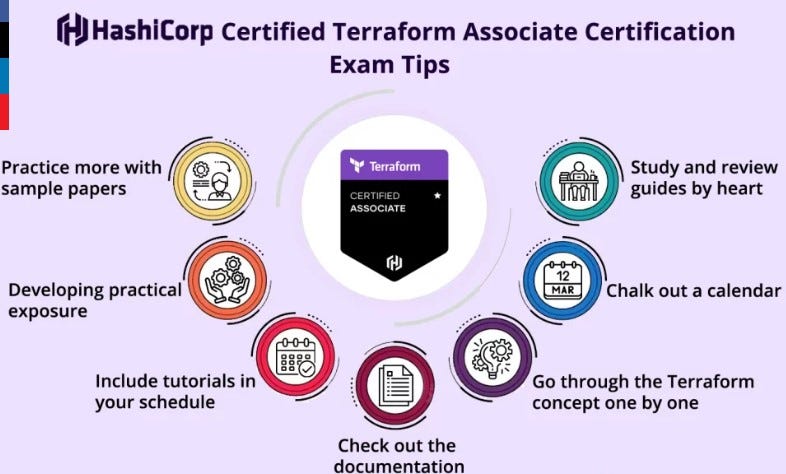
- Revise Key Concepts: Quickly review all core topics, such as providers, state management, remote state, modules, and CLI commands.
- Focus on Practical Knowledge: The exam includes scenario-based questions. Be sure you know how to apply concepts like lifecycle rules, using modules, and importing resources.
- Time Management: The exam is time-bound, so do not spend too long on any single question. Flag difficult ones and return to them later.
- Read Carefully: Pay close attention to what each question is asking. Small details can change the answer.
- Use HashiCorp Resources: If allowed, consult Terraform’s official documentation for any grey areas (if the exam is open book).
Conclusion
The Terraform Associate Certification is a stepping stone for mastering Infrastructure as Code and advancing in the DevOps field. This 21-day plan ensures a solid foundation for beginners, combining theory with practical experience. Stay consistent, focus on understanding the core concepts, and practice regularly to reinforce your knowledge.
With dedicated effort and this structured roadmap, you’ll not only be prepared to pass the certification but also gain hands-on expertise that can be applied to real-world scenarios. Good luck on your journey to becoming a certified Terraform Associate!
Related/References
- HashiCorp Infrastructure Automation Certification: Terraform Associate
- HashiCorp Certified Terraform Associate-Step By Step Activity Guides
- Install Terraform in Linux, Mac, Windows
- Why Terraform? Not Chef, Ansible, Puppet, CloudFormation?
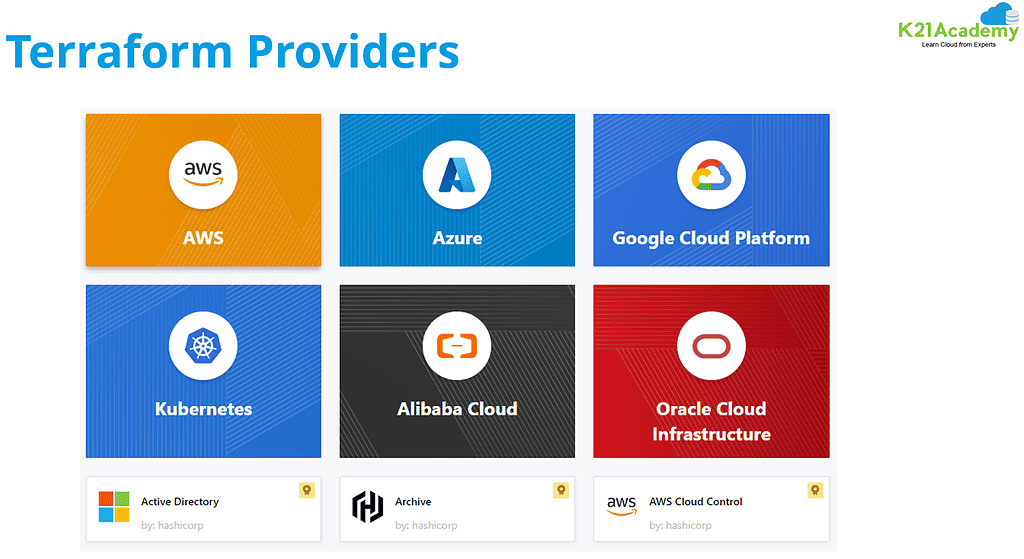
- Terraform Providers Overview
- Terraform Variables – Terraform Variable Types
Join FREE Class
🚀 Master Terraform & DevOps to get High-Paying Jobs! 🔥 Join our EXCLUSIVE Free class! 🚀
Get your hands dirty with lots of projects and labs based on Terraform and DevOps in our Program.Click on the below image to Register for Our FREE Class Now!